mirror of
https://github.com/evennia/evennia.git
synced 2026-03-17 05:16:31 +01:00

639 lines
25 KiB
Markdown
639 lines
25 KiB
Markdown
# Web Character Generation
|
||
|
||
|
||
## Introduction
|
||
|
||
This tutorial will create a simple web-based interface for generating a new in-game Character.
|
||
Accounts will need to have first logged into the website (with their `AccountDB` account). Once
|
||
finishing character generation the Character will be created immediately and the Accounts can then
|
||
log into the game and play immediately (the Character will not require staff approval or anything
|
||
like that). This guide does not go over how to create an AccountDB on the website with the right
|
||
permissions to transfer to their web-created characters.
|
||
|
||
It is probably most useful to set `MULTISESSION_MODE = 2` or `3` (which gives you a character-
|
||
selection screen when you log into the game later). Other modes can be used with some adaptation to
|
||
auto-puppet the new Character.
|
||
|
||
You should have some familiarity with how Django sets up its Model Template View framework. You need
|
||
to understand what is happening in the basic [Web Character View tutorial](Web-Character-View-
|
||
Tutorial). If you don’t understand the listed tutorial or have a grasp of Django basics, please look
|
||
at the [Django tutorial](https://docs.djangoproject.com/en/1.8/intro/) to get a taste of what Django
|
||
does, before throwing Evennia into the mix (Evennia shares its API and attributes with the website
|
||
interface). This guide will outline the format of the models, views, urls, and html templates
|
||
needed.
|
||
|
||
## Pictures
|
||
|
||
Here are some screenshots of the simple app we will be making.
|
||
|
||
Index page, with no character application yet done:
|
||
|
||
***
|
||

|
||
***
|
||
|
||
Having clicked the "create" link you get to create your character (here we will only have name and
|
||
background, you can add whatever is needed to fit your game):
|
||
|
||
***
|
||

|
||
***
|
||
|
||
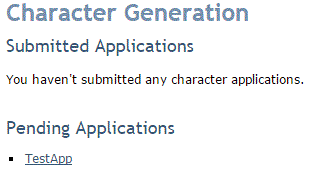
Back to the index page. Having entered our character application (we called our character "TestApp")
|
||
you see it listed:
|
||
|
||
***
|
||
|
||
***
|
||
|
||
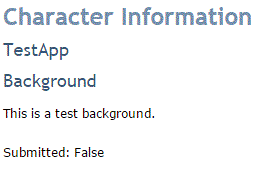
We can also view an already written character application by clicking on it - this brings us to the
|
||
*detail* page:
|
||
|
||
***
|
||
|
||
***
|
||
|
||
## Installing an App
|
||
|
||
Assuming your game is named "mygame", navigate to your `mygame/` directory, and type:
|
||
|
||
evennia startapp chargen
|
||
|
||
This will initialize a new Django app we choose to call "chargen". It is directory containing some
|
||
basic starting things Django needs. You will need to move this directory: for the time being, it is
|
||
in your `mygame` directory. Better to move it in your `mygame/web` directory, so you have
|
||
`mygame/web/chargen` in the end.
|
||
|
||
Next, navigate to `mygame/server/conf/settings.py` and add or edit the following line to make
|
||
Evennia (and Django) aware of our new app:
|
||
|
||
INSTALLED_APPS += ('web.chargen',)
|
||
|
||
After this, we will get into defining our *models* (the description of the database storage),
|
||
*views* (the server-side website content generators), *urls* (how the web browser finds the pages)
|
||
and *templates* (how the web page should be structured).
|
||
|
||
### Installing - Checkpoint:
|
||
|
||
* you should have a folder named `chargen` or whatever you chose in your mygame/web/ directory
|
||
* you should have your application name added to your INSTALLED_APPS in settings.py
|
||
|
||
## Create Models
|
||
|
||
Models are created in `mygame/web/chargen/models.py`.
|
||
|
||
A [Django database model](../Concepts/New-Models) is a Python class that describes the database storage of the
|
||
data you want to manage. Any data you choose to store is stored in the same database as the game and
|
||
you have access to all the game's objects here.
|
||
|
||
We need to define what a character application actually is. This will differ from game to game so
|
||
for this tutorial we will define a simple character sheet with the following database fields:
|
||
|
||
|
||
* `app_id` (AutoField): Primary key for this character application sheet.
|
||
* `char_name` (CharField): The new character's name.
|
||
* `date_applied` (DateTimeField): Date that this application was received.
|
||
* `background` (TextField): Character story background.
|
||
* `account_id` (IntegerField): Which account ID does this application belong to? This is an
|
||
AccountID from the AccountDB object.
|
||
* `submitted` (BooleanField): `True`/`False` depending on if the application has been submitted yet.
|
||
|
||
> Note: In a full-fledged game, you’d likely want them to be able to select races, skills,
|
||
attributes and so on.
|
||
|
||
Our `models.py` file should look something like this:
|
||
|
||
```python
|
||
# in mygame/web/chargen/models.py
|
||
|
||
from django.db import models
|
||
|
||
class CharApp(models.Model):
|
||
app_id = models.AutoField(primary_key=True)
|
||
char_name = models.CharField(max_length=80, verbose_name='Character Name')
|
||
date_applied = models.DateTimeField(verbose_name='Date Applied')
|
||
background = models.TextField(verbose_name='Background')
|
||
account_id = models.IntegerField(default=1, verbose_name='Account ID')
|
||
submitted = models.BooleanField(default=False)
|
||
```
|
||
|
||
You should consider how you are going to link your application to your account. For this tutorial,
|
||
we are using the account_id attribute on our character application model in order to keep track of
|
||
which characters are owned by which accounts. Since the account id is a primary key in Evennia, it
|
||
is a good candidate, as you will never have two of the same IDs in Evennia. You can feel free to use
|
||
anything else, but for the purposes of this guide, we are going to use account ID to join the
|
||
character applications with the proper account.
|
||
|
||
### Model - Checkpoint:
|
||
|
||
* you should have filled out `mygame/web/chargen/models.py` with the model class shown above
|
||
(eventually adding fields matching what you need for your game).
|
||
|
||
## Create Views
|
||
|
||
*Views* are server-side constructs that make dynamic data available to a web page. We are going to
|
||
add them to `mygame/web/chargen.views.py`. Each view in our example represents the backbone of a
|
||
specific web page. We will use three views and three pages here:
|
||
|
||
* The index (managing `index.html`). This is what you see when you navigate to
|
||
`http://yoursite.com/chargen`.
|
||
* The detail display sheet (manages `detail.html`). A page that passively displays the stats of a
|
||
given Character.
|
||
* Character creation sheet (manages `create.html`). This is the main form with fields to fill in.
|
||
|
||
### *Index* view
|
||
|
||
Let’s get started with the index first.
|
||
|
||
We’ll want characters to be able to see their created characters so let’s
|
||
|
||
```python
|
||
# file mygame/web/chargen.views.py
|
||
|
||
from .models import CharApp
|
||
|
||
def index(request):
|
||
current_user = request.user # current user logged in
|
||
p_id = current_user.id # the account id
|
||
# submitted Characters by this account
|
||
sub_apps = CharApp.objects.filter(account_id=p_id, submitted=True)
|
||
context = {'sub_apps': sub_apps}
|
||
# make the variables in 'context' available to the web page template
|
||
return render(request, 'chargen/index.html', context)
|
||
```
|
||
|
||
### *Detail* view
|
||
|
||
Our detail page will have pertinent character application information our users can see. Since this
|
||
is a basic demonstration, our detail page will only show two fields:
|
||
|
||
* Character name
|
||
* Character background
|
||
|
||
We will use the account ID again just to double-check that whoever tries to check our character page
|
||
is actually the account who owns the application.
|
||
|
||
```python
|
||
# file mygame/web/chargen.views.py
|
||
|
||
def detail(request, app_id):
|
||
app = CharApp.objects.get(app_id=app_id)
|
||
name = app.char_name
|
||
background = app.background
|
||
submitted = app.submitted
|
||
p_id = request.user.id
|
||
context = {'name': name, 'background': background,
|
||
'p_id': p_id, 'submitted': submitted}
|
||
return render(request, 'chargen/detail.html', context)
|
||
```
|
||
|
||
## *Creating* view
|
||
|
||
Predictably, our *create* function will be the most complicated of the views, as it needs to accept
|
||
information from the user, validate the information, and send the information to the server. Once
|
||
the form content is validated will actually create a playable Character.
|
||
|
||
The form itself we will define first. In our simple example we are just looking for the Character's
|
||
name and background. This form we create in `mygame/web/chargen/forms.py`:
|
||
|
||
```python
|
||
# file mygame/web/chargen/forms.py
|
||
|
||
from django import forms
|
||
|
||
class AppForm(forms.Form):
|
||
name = forms.CharField(label='Character Name', max_length=80)
|
||
background = forms.CharField(label='Background')
|
||
```
|
||
|
||
Now we make use of this form in our view.
|
||
|
||
```python
|
||
# file mygame/web/chargen/views.py
|
||
|
||
from web.chargen.models import CharApp
|
||
from web.chargen.forms import AppForm
|
||
from django.http import HttpResponseRedirect
|
||
from datetime import datetime
|
||
from evennia.objects.models import ObjectDB
|
||
from django.conf import settings
|
||
from evennia.utils import create
|
||
|
||
def creating(request):
|
||
user = request.user
|
||
if request.method == 'POST':
|
||
form = AppForm(request.POST)
|
||
if form.is_valid():
|
||
name = form.cleaned_data['name']
|
||
background = form.cleaned_data['background']
|
||
applied_date = datetime.now()
|
||
submitted = True
|
||
if 'save' in request.POST:
|
||
submitted = False
|
||
app = CharApp(char_name=name, background=background,
|
||
date_applied=applied_date, account_id=user.id,
|
||
submitted=submitted)
|
||
app.save()
|
||
if submitted:
|
||
# Create the actual character object
|
||
typeclass = settings.BASE_CHARACTER_TYPECLASS
|
||
home = ObjectDB.objects.get_id(settings.GUEST_HOME)
|
||
# turn the permissionhandler to a string
|
||
perms = str(user.permissions)
|
||
# create the character
|
||
char = create.create_object(typeclass=typeclass, key=name,
|
||
home=home, permissions=perms)
|
||
user.db._playable_characters.append(char)
|
||
# add the right locks for the character so the account can
|
||
# puppet it
|
||
char.locks.add("puppet:id(%i) or pid(%i) or perm(Developers) "
|
||
"or pperm(Developers)" % (char.id, user.id))
|
||
char.db.background = background # set the character background
|
||
return HttpResponseRedirect('/chargen')
|
||
else:
|
||
form = AppForm()
|
||
return render(request, 'chargen/create.html', {'form': form})
|
||
```
|
||
|
||
> Note also that we basically create the character using the Evennia API, and we grab the proper
|
||
permissions from the `AccountDB` object and copy them to the character object. We take the user
|
||
permissions attribute and turn that list of strings into a string object in order for the
|
||
create_object function to properly process the permissions.
|
||
|
||
Most importantly, the following attributes must be set on the created character object:
|
||
|
||
* Evennia [permissions](../Components/Locks#permissions) (copied from the `AccountDB`).
|
||
* The right `puppet` [locks](../Components/Locks) so the Account can actually play as this Character later.
|
||
* The relevant Character [typeclass](../Components/Typeclasses)
|
||
* Character name (key)
|
||
* The Character's home room location (`#2` by default)
|
||
|
||
Other attributes are strictly speaking optional, such as the `background` attribute on our
|
||
character. It may be a good idea to decompose this function and create a separate _create_character
|
||
function in order to set up your character object the account owns. But with the Evennia API,
|
||
setting custom attributes is as easy as doing it in the meat of your Evennia game directory.
|
||
|
||
After all of this, our `views.py` file should look like something like this:
|
||
|
||
```python
|
||
# file mygame/web/chargen/views.py
|
||
|
||
from django.shortcuts import render
|
||
from web.chargen.models import CharApp
|
||
from web.chargen.forms import AppForm
|
||
from django.http import HttpResponseRedirect
|
||
from datetime import datetime
|
||
from evennia.objects.models import ObjectDB
|
||
from django.conf import settings
|
||
from evennia.utils import create
|
||
|
||
def index(request):
|
||
current_user = request.user # current user logged in
|
||
p_id = current_user.id # the account id
|
||
# submitted apps under this account
|
||
sub_apps = CharApp.objects.filter(account_id=p_id, submitted=True)
|
||
context = {'sub_apps': sub_apps}
|
||
return render(request, 'chargen/index.html', context)
|
||
|
||
def detail(request, app_id):
|
||
app = CharApp.objects.get(app_id=app_id)
|
||
name = app.char_name
|
||
background = app.background
|
||
submitted = app.submitted
|
||
p_id = request.user.id
|
||
context = {'name': name, 'background': background,
|
||
'p_id': p_id, 'submitted': submitted}
|
||
return render(request, 'chargen/detail.html', context)
|
||
|
||
def creating(request):
|
||
user = request.user
|
||
if request.method == 'POST':
|
||
form = AppForm(request.POST)
|
||
if form.is_valid():
|
||
name = form.cleaned_data['name']
|
||
background = form.cleaned_data['background']
|
||
applied_date = datetime.now()
|
||
submitted = True
|
||
if 'save' in request.POST:
|
||
submitted = False
|
||
app = CharApp(char_name=name, background=background,
|
||
date_applied=applied_date, account_id=user.id,
|
||
submitted=submitted)
|
||
app.save()
|
||
if submitted:
|
||
# Create the actual character object
|
||
typeclass = settings.BASE_CHARACTER_TYPECLASS
|
||
home = ObjectDB.objects.get_id(settings.GUEST_HOME)
|
||
# turn the permissionhandler to a string
|
||
perms = str(user.permissions)
|
||
# create the character
|
||
char = create.create_object(typeclass=typeclass, key=name,
|
||
home=home, permissions=perms)
|
||
user.db._playable_characters.append(char)
|
||
# add the right locks for the character so the account can
|
||
# puppet it
|
||
char.locks.add("puppet:id(%i) or pid(%i) or perm(Developers) "
|
||
"or pperm(Developers)" % (char.id, user.id))
|
||
char.db.background = background # set the character background
|
||
return HttpResponseRedirect('/chargen')
|
||
else:
|
||
form = AppForm()
|
||
return render(request, 'chargen/create.html', {'form': form})
|
||
```
|
||
|
||
### Create Views - Checkpoint:
|
||
|
||
* you’ve defined a `views.py` that has an index, detail, and creating functions.
|
||
* you’ve defined a forms.py with the `AppForm` class needed by the `creating` function of
|
||
`views.py`.
|
||
* your `mygame/web/chargen` directory should now have a `views.py` and `forms.py` file
|
||
|
||
## Create URLs
|
||
|
||
URL patterns helps redirect requests from the web browser to the right views. These patterns are
|
||
created in `mygame/web/chargen/urls.py`.
|
||
|
||
```python
|
||
# file mygame/web/chargen/urls.py
|
||
|
||
from django.conf.urls import url
|
||
from web.chargen import views
|
||
|
||
urlpatterns = [
|
||
# ex: /chargen/
|
||
url(r'^$', views.index, name='index'),
|
||
# ex: /chargen/5/
|
||
url(r'^(?P<app_id>[0-9]+)/$', views.detail, name='detail'),
|
||
# ex: /chargen/create
|
||
url(r'^create/$', views.creating, name='creating'),
|
||
]
|
||
```
|
||
|
||
You could change the format as you desire. To make it more secure, you could remove app_id from the
|
||
"detail" url, and instead just fetch the account’s applications using a unifying field like
|
||
account_id to find all the character application objects to display.
|
||
|
||
We must also update the main `mygame/web/urls.py` file (that is, one level up from our chargen app),
|
||
so the main website knows where our app's views are located. Find the `patterns` variable, and
|
||
change it to include:
|
||
|
||
```python
|
||
# in file mygame/web/urls.py
|
||
|
||
from django.conf.urls import url, include
|
||
|
||
# default evennia patterns
|
||
from evennia.web.urls import urlpatterns
|
||
|
||
# eventual custom patterns
|
||
custom_patterns = [
|
||
# url(r'/desired/url/', view, name='example'),
|
||
]
|
||
|
||
# this is required by Django.
|
||
urlpatterns += [
|
||
url(r'^chargen/', include('web.chargen.urls')),
|
||
]
|
||
|
||
urlpatterns = custom_patterns + urlpatterns
|
||
```
|
||
|
||
### URLs - Checkpoint:
|
||
|
||
* You’ve created a urls.py file in the `mygame/web/chargen` directory
|
||
* You have edited the main `mygame/web/urls.py` file to include urls to the `chargen` directory.
|
||
|
||
## HTML Templates
|
||
|
||
So we have our url patterns, views, and models defined. Now we must define our HTML templates that
|
||
the actual user will see and interact with. For this tutorial we us the basic *prosimii* template
|
||
that comes with Evennia.
|
||
|
||
Take note that we use `user.is_authenticated` to make sure that the user cannot create a character
|
||
without logging in.
|
||
|
||
These files will all go into the `/mygame/web/chargen/templates/chargen/` directory.
|
||
|
||
### index.html
|
||
|
||
This HTML template should hold a list of all the applications the account currently has active. For
|
||
this demonstration, we will only list the applications that the account has submitted. You could
|
||
easily adjust this to include saved applications, or other types of applications if you have
|
||
different kinds.
|
||
|
||
Please refer back to `views.py` to see where we define the variables these templates make use of.
|
||
|
||
```html
|
||
<!-- file mygame/web/chargen/templates/chargen/index.html-->
|
||
|
||
{% extends "base.html" %}
|
||
{% block content %}
|
||
{% if user.is_authenticated %}
|
||
<h1>Character Generation</h1>
|
||
{% if sub_apps %}
|
||
<ul>
|
||
{% for sub_app in sub_apps %}
|
||
<li><a href="/chargen/{{ sub_app.app_id }}/">{{ sub_app.char_name }}</a></li>
|
||
{% endfor %}
|
||
</ul>
|
||
{% else %}
|
||
<p>You haven't submitted any character applications.</p>
|
||
{% endif %}
|
||
{% else %}
|
||
<p>Please <a href="{% url 'login'%}">login</a>first.<a/></p>
|
||
{% endif %}
|
||
{% endblock %}
|
||
```
|
||
|
||
### detail.html
|
||
|
||
This page should show a detailed character sheet of their application. This will only show their
|
||
name and character background. You will likely want to extend this to show many more fields for your
|
||
game. In a full-fledged character generation, you may want to extend the boolean attribute of
|
||
submitted to allow accounts to save character applications and submit them later.
|
||
|
||
```html
|
||
<!-- file mygame/web/chargen/templates/chargen/detail.html-->
|
||
|
||
{% extends "base.html" %}
|
||
{% block content %}
|
||
<h1>Character Information</h1>
|
||
{% if user.is_authenticated %}
|
||
{% if user.id == p_id %}
|
||
<h2>{{name}}</h2>
|
||
<h2>Background</h2>
|
||
<p>{{background}}</p>
|
||
<p>Submitted: {{submitted}}</p>
|
||
{% else %}
|
||
<p>You didn't submit this character.</p>
|
||
{% endif %}
|
||
{% else %}
|
||
<p>You aren't logged in.</p>
|
||
{% endif %}
|
||
{% endblock %}
|
||
```
|
||
|
||
### create.html
|
||
|
||
Our create HTML template will use the Django form we defined back in views.py/forms.py to drive the
|
||
majority of the application process. There will be a form input for every field we defined in
|
||
forms.py, which is handy. We have used POST as our method because we are sending information to the
|
||
server that will update the database. As an alternative, GET would be much less secure. You can read
|
||
up on documentation elsewhere on the web for GET vs. POST.
|
||
|
||
```html
|
||
<!-- file mygame/web/chargen/templates/chargen/create.html-->
|
||
|
||
{% extends "base.html" %}
|
||
{% block content %}
|
||
<h1>Character Creation</h1>
|
||
{% if user.is_authenticated %}
|
||
<form action="/chargen/create/" method="post">
|
||
{% csrf_token %}
|
||
{{ form }}
|
||
<input type="submit" name="submit" value="Submit"/>
|
||
</form>
|
||
{% else %}
|
||
<p>You aren't logged in.</p>
|
||
{% endif %}
|
||
{% endblock %}
|
||
```
|
||
|
||
### Templates - Checkpoint:
|
||
|
||
* Create a `index.html`, `detail.html` and `create.html` template in your
|
||
`mygame/web/chargen/templates/chargen` directory
|
||
|
||
## Activating your new character generation
|
||
|
||
After finishing this tutorial you should have edited or created the following files:
|
||
|
||
```bash
|
||
mygame/web/urls.py
|
||
mygame/web/chargen/models.py
|
||
mygame/web/chargen/views.py
|
||
mygame/web/chargen/urls.py
|
||
mygame/web/chargen/templates/chargen/index.html
|
||
mygame/web/chargen/templates/chargen/create.html
|
||
mygame/web/chargen/templates/chargen/detail.html
|
||
```
|
||
|
||
Once you have all these files stand in your `mygame/`folder and run:
|
||
|
||
```bash
|
||
evennia makemigrations
|
||
evennia migrate
|
||
```
|
||
|
||
This will create and update the models. If you see any errors at this stage, read the traceback
|
||
carefully, it should be relatively easy to figure out where the error is.
|
||
|
||
Login to the website (you need to have previously registered an Player account with the game to do
|
||
this). Next you navigate to `http://yourwebsite.com/chargen` (if you are running locally this will
|
||
be something like `http://localhost:4001/chargen` and you will see your new app in action.
|
||
|
||
This should hopefully give you a good starting point in figuring out how you’d like to approach your
|
||
own web generation. The main difficulties are in setting the appropriate settings on your newly
|
||
created character object. Thankfully, the Evennia API makes this easy.
|
||
|
||
## Adding a no CAPCHA reCAPCHA on your character generation
|
||
|
||
As sad as it is, if your server is open to the web, bots might come to visit and take advantage of
|
||
your open form to create hundreds, thousands, millions of characters if you give them the
|
||
opportunity. This section shows you how to use the [No CAPCHA
|
||
reCAPCHA](https://www.google.com/recaptcha/intro/invisible.html) designed by Google. Not only is it
|
||
easy to use, it is user-friendly... for humans. A simple checkbox to check, except if Google has
|
||
some suspicion, in which case you will have a more difficult test with an image and the usual text
|
||
inside. It's worth pointing out that, as long as Google doesn't suspect you of being a robot, this
|
||
is quite useful, not only for common users, but to screen-reader users, to which reading inside of
|
||
an image is pretty difficult, if not impossible. And to top it all, it will be so easy to add in
|
||
your website.
|
||
|
||
### Step 1: Obtain a SiteKey and secret from Google
|
||
|
||
The first thing is to ask Google for a way to safely authenticate your website to their service. To
|
||
do it, we need to create a site key and a secret. Go to
|
||
[https://www.google.com/recaptcha/admin](https://www.google.com/recaptcha/admin) to create such a
|
||
site key. It's quite easy when you have a Google account.
|
||
|
||
When you have created your site key, save it safely. Also copy your secret key as well. You should
|
||
find both information on the web page. Both would contain a lot of letters and figures.
|
||
|
||
### Step 2: installing and configuring the dedicated Django app
|
||
|
||
Since Evennia runs on Django, the easiest way to add our CAPCHA and perform the proper check is to
|
||
install the dedicated Django app. Quite easy:
|
||
|
||
pip install django-nocaptcha-recaptcha
|
||
|
||
And add it to the installed apps in your settings. In your `mygame/server/conf/settings.py`, you
|
||
might have something like this:
|
||
|
||
```python
|
||
# ...
|
||
INSTALLED_APPS += (
|
||
'web.chargen',
|
||
'nocaptcha_recaptcha',
|
||
)
|
||
```
|
||
|
||
Don't close the setting file just yet. We have to add in the site key and secret key. You can add
|
||
them below:
|
||
|
||
```python
|
||
# NoReCAPCHA site key
|
||
NORECAPTCHA_SITE_KEY = "PASTE YOUR SITE KEY HERE"
|
||
# NoReCAPCHA secret key
|
||
NORECAPTCHA_SECRET_KEY = "PUT YOUR SECRET KEY HERE"
|
||
```
|
||
|
||
### Step 3: Adding the CAPCHA to our form
|
||
|
||
Finally we have to add the CAPCHA to our form. It will be pretty easy too. First, open your
|
||
`web/chargen/forms.py` file. We're going to add a new field, but hopefully, all the hard work has
|
||
been done for us. Update at your convenience, You might end up with something like this:
|
||
|
||
```python
|
||
from django import forms
|
||
from nocaptcha_recaptcha.fields import NoReCaptchaField
|
||
|
||
class AppForm(forms.Form):
|
||
name = forms.CharField(label='Character Name', max_length=80)
|
||
background = forms.CharField(label='Background')
|
||
captcha = NoReCaptchaField()
|
||
```
|
||
|
||
As you see, we added a line of import (line 2) and a field in our form.
|
||
|
||
And lastly, we need to update our HTML file to add in the Google library. You can open
|
||
`web/chargen/templates/chargen/create.html`. There's only one line to add:
|
||
|
||
```html
|
||
<script src="https://www.google.com/recaptcha/api.js" async defer></script>
|
||
```
|
||
|
||
And you should put it at the bottom of the page. Just before the closing body would be good, but
|
||
for the time being, the base page doesn't provide a footer block, so we'll put it in the content
|
||
block. Note that it's not the best place, but it will work. In the end, your
|
||
`web/chargen/templates/chargen/create.html` file should look like this:
|
||
|
||
```html
|
||
{% extends "base.html" %}
|
||
{% block content %}
|
||
<h1>Character Creation</h1>
|
||
{% if user.is_authenticated %}
|
||
<form action="/chargen/create/" method="post">
|
||
{% csrf_token %}
|
||
{{ form }}
|
||
<input type="submit" name="submit" value="Submit"/>
|
||
</form>
|
||
{% else %}
|
||
<p>You aren't logged in.</p>
|
||
{% endif %}
|
||
<script src="https://www.google.com/recaptcha/api.js" async defer></script>
|
||
{% endblock %}
|
||
```
|
||
|
||
Reload and open [http://localhost:4001/chargen/create](http://localhost:4001/chargen/create/) and
|
||
you should see your beautiful CAPCHA just before the "submit" button. Try not to check the checkbox
|
||
to see what happens. And do the same while checking the checkbox!
|