 08b333501b
* 🎨 bazaar resource directories support symlink * 🎨 bazaar resource directories support symlink * Squashed commit of the following: commit |
||
|---|---|---|
| .github | ||
| app | ||
| kernel | ||
| screenshots | ||
| scripts | ||
| .gitattributes | ||
| .gitignore | ||
| API.md | ||
| API_zh_CN.md | ||
| CHANGELOG.md | ||
| Dockerfile | ||
| LICENSE | ||
| README.md | ||
| README_zh_CN.md | ||

Build Your Eternal Digital Garden




💡 Introduction
SiYuan is a privacy-first personal knowledge management system, support fine-grained block-level reference and Markdown WYSIWYG.
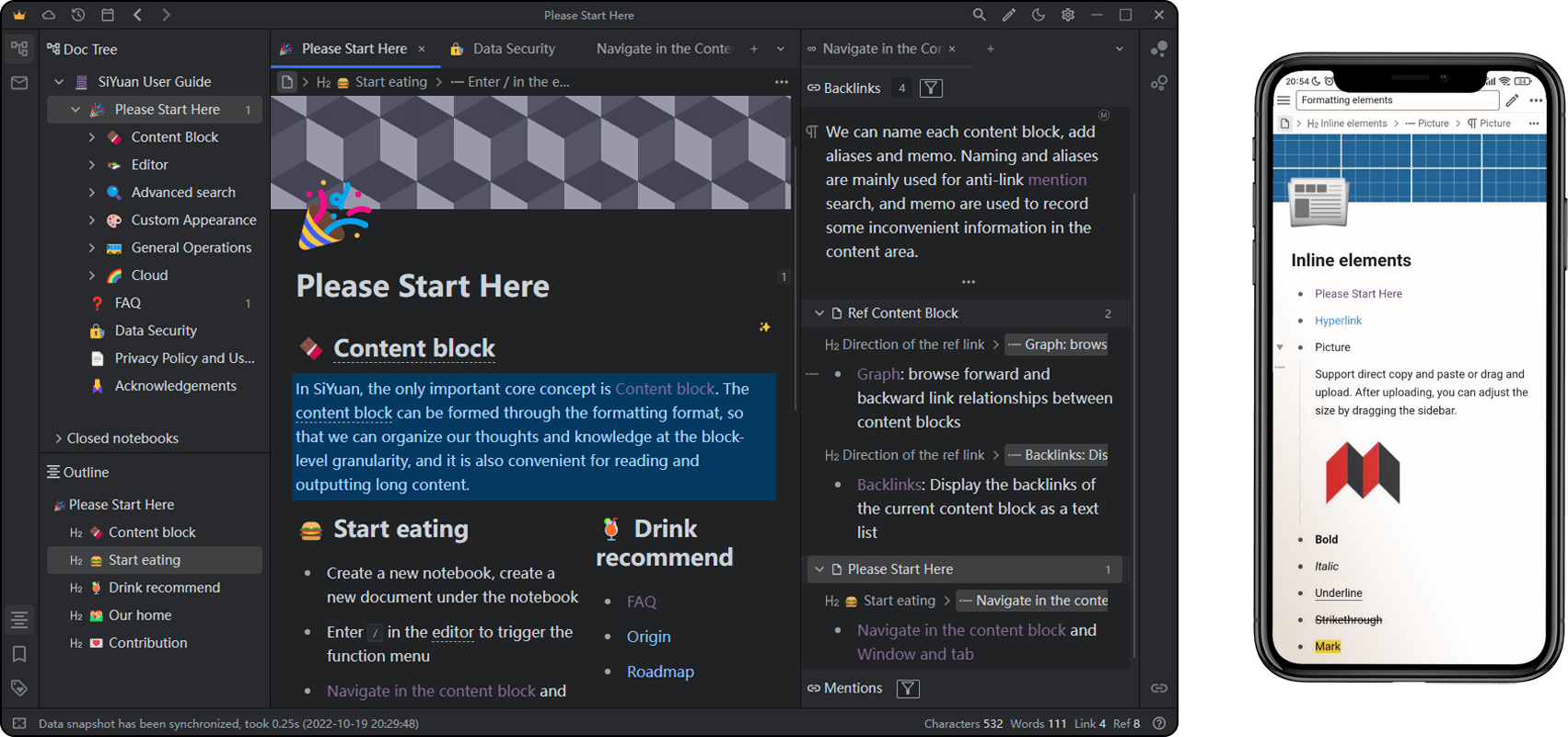
🔮 Features
Free
All local features are free, even for commercial use.
- Content block
- Block-level reference and two-way links
- Custom attributes
- SQL query embed
- Protocol
siyuan://
- Editor
- Block-style
- Markdown WYSIWYG
- List outline
- Block zoom-in
- Block horizontal layout
- Million-word large document editing
- Mathematical formulas, charts, flowcharts, Gantt charts, timing charts, staffs, etc.
- Web clipping
- PDF Annotation link
- Export
- Block ref and embed
- Standard Markdown with assets
- PDF, Word and HTML
- Copy to WeChat MP, Zhihu and Yuque
- End-to-end encrypted data sync and backup via the third-party cloud storage services
- S3
- WebDAV
- Spaced repetition
- Multi-tab, drag and drop to split screen
- Template snippet
- JavaScript/CSS snippet
- Android/iOS APP
- Docker deployment
- API
- Community bazaar
Paid subscription
Cloud services require a paid subscription.
- VIP identity
- End-to-end encrypted data sync and backup
- Cloud assets serving
- WeChat notification
- Cloud inbox
🌟 Star History
🗺️ Roadmap
🚀 Download Setup
It is recommended to give priority to installing through the application market on the desktop and mobile, so that you can upgrade the version with one click in the future.
App Market
Docker Hosting
Docker Deployment
Overview
The easiest way to serve SiYuan on a server is to deploy it through Docker.
- Image name
b3log/siyuan - Image URL
File structure
The overall program is located under /opt/siyuan/, which is basically the structure under the resources folder of the Electron installation package:
- appearance: icon, theme, languages
- guide: user guide document
- stage: interface and static resources
- kernel: kernel program
Entrypoint
The entry point is set when building the Docker image: ENTRYPOINT ["/opt/siyuan/kernel" ], use docker run b3log/siyuan with parameters to start:
--workspacespecifies the workspace folder path, mounted to the container via-von the host
More parameters can refer to --help. The following is an example of a startup command: docker run -v workspace_dir_host:workspace_dir_container -p 6806:6806 b3log/siyuan --workspace=workspace_dir_container
workspace_dir_host: the workspace folder path on the hostworkspace_dir_container: The path of the workspace folder in the container, which is the same as specified in--workspace
To simplify, it is recommended to configure the workspace folder path to be consistent on the host and container, such as: workspace_dir_host and workspace_dir_container are configured as /siyuan/workspace, the corresponding startup commands is: docker run -v /siyuan/workspace:/siyuan/workspace -p 6806:6806 -u 1000:1000 b3log/siyuan --workspace=/siyuan/workspace/.
User permissions
In the image, the normal user siyuan (uid 1000/gid 1000) created by default is used to start the kernel process. Therefore, when the host creates a workspace folder, please pay attention to setting the user group of the folder: chown -R 1000:1000 /siyuan/workspace. The parameter -u 1000:1000 is required when starting the container.
Hidden port
Use NGINX reverse proxy to hide port 6806, please note:
- Configure WebSocket reverse proxy
/ws
Note
- Be sure to confirm the correctness of the mounted volume, otherwise the data will be lost after the container is deleted
- Do not use URL rewriting for redirection, otherwise there may be problems with authentication, it is recommended to configure a reverse proxy
Limitations
- Does not support desktop and mobile application connections, only supports use on browsers
- Export to PDF, HTML and Word formats is not supported
- Import Markdown file is not supported
Installation Package
Insider Preview
We release insider preview before major updates, please visit https://github.com/siyuan-note/insider.
🏘️ Community
- Issues Official support channels
- Discord A community built by enthusiastic users
- Awesome SiYuan Resources organized by enthusiastic users
🛠️ Development Guide
See Development Guide.
❓ FAQ
Is SiYuan right for me? Or how should I choose note-taking software?
This question varies from person to person and is difficult to answer uniformly. If you're not sure if SiYuan is right for you, here are some suggestions:
-
If you need to frequently share notes or edit collaboratively with others, and need the data table function, it is recommended to use:
-
If you like to use plain text Markdown files to store your notes, it is recommended to use:
How does SiYuan store data?
The data is saved in the workspace folder, in the workspace data folder:
assetsis used to save all inserted assetsemojisis used to save emoji imagessnippetsis used to save code snippetsstorageis used to save query conditions, layouts and flashcards, etc.templatesis used to save template snippetswidgetsis used to save widgetspluginsis used to save plugins- The rest of the folders are the notebook folders created by the user, files with the suffix of
.syin the notebook folder are used to save the document data, and the data format is JSON
Does it support data synchronization through a third-party sync disk?
Data synchronization through third-party synchronization disks is not supported, otherwise data may be corrupted.
Although it does not support third-party sync disks, it supports third-party cloud storage services, which can be configured in Settings - Cloud - Cloud Storage Provider, currently supported:
- S3 compatible object storage services, such as Qiniu, Aliyun OSS, Cloudflare R2
- WebDAV protocol, such as TeraCLOUD, Koofr
Synchronizing data through third-party cloud storage services is also end-to-end encrypted, and third-party cloud storage service providers cannot obtain our plaintext data.
In addition, you can also consider manually exporting and importing data to achieve data synchronization:
- Desktop: Settings - Export - Export Data / Import Data
- Mobile: Right column - About - Export Data / Import Data
Is SiYuan open source?
SiYuan is completely open source, and contributions are welcome:
For more details, please refer to Development Guide.
How to upgrade to a new version?
- If installed via app store, please update via app store
- If it is installed through the installation package on the desktop, you can open the option of Settings - About - Automatically download update installation package, so that SiYuan will automatically download The latest version of the installation package and prompts to install
- If it is installed by manual installation package, please download the installation package again to install
You can Check update in Settings - About - Current Version, or by following GitHub Releases or SiYuan Announcement to get the new version.
Note: Do not place the workspace in the installation directory, because the updated version will clear all files in the installation directory
Is there any note for deleting docs?
After deletion, the doc will not appear in the operating system's recycle bin, but will be deleted directly. When deleted, SiYuan will generate data history.
How can I just wrap and not start a new paragraph?
Please use Shift+Enter.
What if some blocks (such as paragraph blocks in list items) cannot find the block icon?
The first sub-block under the list item is the block icon omitted. You can move the cursor into this block and trigger its block menu with Ctrl+/ .
How to share notes?
- Share document to Liandi
- Export and import
.sy.zippackage - Via network hosting
- Export and import Markdown
- Export Preview to copy to third-party online services
What should I do if the data repo key is lost?
-
If the data repo key is correctly initialized on multiple devices before, the key is the same on all devices and can be set in Settings - About - Data repo key - Copy key string retrieve
-
If it has not been configured correctly before (for example, the keys on multiple devices are inconsistent) or all devices are unavailable and the key string cannot be obtained, you can reset the key by following the steps below:
- Manually back up the data, you can use Export Data or directly copy the workspace/data/ folder on the file system
- Settings - About - Data rep key - Reset data repo
- Reinitialize the data repo key. After initializing the key on one device, other devices import the key
- The cloud uses the new synchronization directory, the old synchronization directory is no longer available and can be deleted
- The existing cloud snapshots are no longer available and can be deleted
Do I need to pay for it?
All local features are free, even for commercial use.
Cloud Service requires an annual subscription. At present, only users in mainland China are supported to subscribe, and users outside of mainland China are not allowed to subscribe.
🙏 Acknowledgement
Contributors
Welcome to join us and contribute code to SiYuan together.
Open source project dependencies
SiYuan is made possible by the following open source projects.
- https://github.com/golang/go
BSD-3-Clause License - https://github.com/atotto/clipboard
BSD-3-Clause License - https://github.com/vanng822/css
MIT License - https://github.com/gofrs/flock
BSD-3-Clause License - https://github.com/olahol/melody
BSD-2-Clause License - https://github.com/pdfcpu/pdfcpu
Apache-2.0 License - https://github.com/blastrain/vitess-sqlparser
Apache-2.0 License - https://github.com/ConradIrwin/font
MIT License - https://github.com/Masterminds/sprig
MIT License - https://github.com/PuerkitoBio/goquery
BSD-3-Clause License - https://github.com/Xuanwo/go-locale
Apache-2.0 License - https://github.com/araddon/dateparse
MIT License - https://github.com/common-nighthawk/go-figure
MIT License - https://github.com/denisbrodbeck/machineid
MIT License - https://github.com/dgraph-io/ristretto
Apache-2.0 License - https://github.com/dustin/go-humanize
MIT License - https://github.com/emirpasic/gods
BSD-2-Clause License - https://github.com/facette/natsort
BSD-3-Clause License - https://github.com/flopp/go-findfont
MIT License - https://github.com/fsnotify/fsnotify
BSD-3-Clause License - https://github.com/gabriel-vasile/mimetype
MIT License - https://github.com/gin-contrib/cors
MIT License - https://github.com/gin-contrib/gzip
MIT License - https://github.com/gin-contrib/sessions
MIT License - https://github.com/gin-gonic/gin
MIT License - https://github.com/go-ole/go-ole
MIT License - https://github.com/imroc/req
MIT License - https://github.com/jinzhu/copier
MIT License - https://github.com/mattn/go-sqlite3
MIT License - https://github.com/mitchellh/go-ps
MIT License - https://github.com/mssola/user_agent
MIT License - https://github.com/panjf2000/ants
MIT License - https://github.com/patrickmn/go-cache
MIT License - https://github.com/radovskyb/watcher
BSD-3-Clause License - https://github.com/sabhiram/go-gitignore
MIT License - https://github.com/steambap/captcha
MIT License - https://github.com/vmihailenco/msgpack
BSD-2-Clause License - https://github.com/xrash/smetrics
MIT License - https://github.com/jgm/pandoc
GPL-2.0 License - https://github.com/microsoft/TypeScript
Apache-2.0 License - https://github.com/electron/electron
MIT License - https://github.com/visjs/vis-network
Apache-2.0 License - https://github.com/mozilla/pdf.js
Apache-2.0 License - https://github.com/blueimp/JavaScript-MD5
MIT License